




50+ Telegram Channels/Groups/Bots & 8 Sites for Telegram Channels Search
 Tony Bennett
  2024.04.08
Telegram is an encrypted messaging application that lets you chat online without anyone snooping on your conversations and calls. Better yet, it is much more than just a chat tool.
In Telegram groups, you can share interesting information with group members. Telegram channels are excellent spaces for broadcasting public messages to an audience. Telegram bots are helpful helpers for managing TG groups and TG channels.
What are the most followed Telegram channels? What are the best Telegram group links? Where can you find Telegram bots? The article below covers everything you want to know. Read on.

How to Unblock Telegram Channels, Groups, and Bots in Restricted Countries
Encrypted chat software is a double-edged sword, and Telegram can sometimes face regional restrictions. For instance, Telegram has experienced blocks or regulatory scrutiny in various regions due to safety and compliance policies.
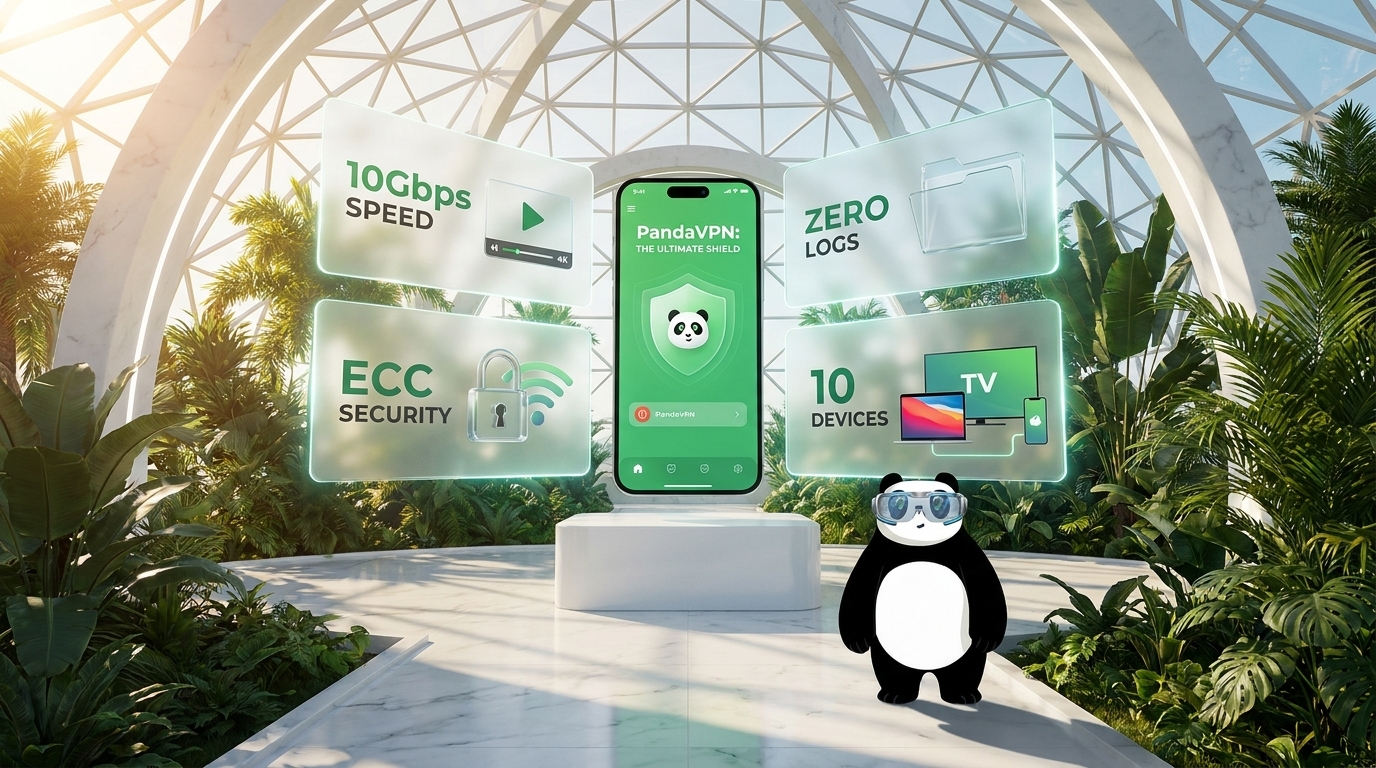
Furthermore, Telegram is permanently banned in countries like Pakistan, China, Iran, and Bahrain. If you live in or travel to such a country, you will need a reliable Telegram VPN. Unlocking Telegram channels, groups, and bots is easy with PandaVPN, a private, secure, and fast VPN app headquartered in the Seychelles.
PandaVPN offers 3,000+ servers distributed across 170+ locations in 80 countries. Connecting to a VPN server allows you to change your IP address, giving you thousands of options to bypass network restrictions. Follow these steps to unblock Telegram channels, groups, or bots:
-
Step 1: Download and install PandaVPN. New users downloading PandaVPN for Android get a 3-day free trial, while iOS users receive a 7-day free trial. Note that iOS users need to subscribe to PandaVPN and complete payment; you can request a refund to cancel your subscription at any time within 7 days while keeping your trial active.
Try PandaVPN for Android | Try PandaVPN for iOS
-
Step 2: Connect to any server location that does not block Telegram. Enter the server list and select a server to connect to (such as in the United States). PandaVPN offers 20+ US servers, making it a great choice for streaming US Netflix.
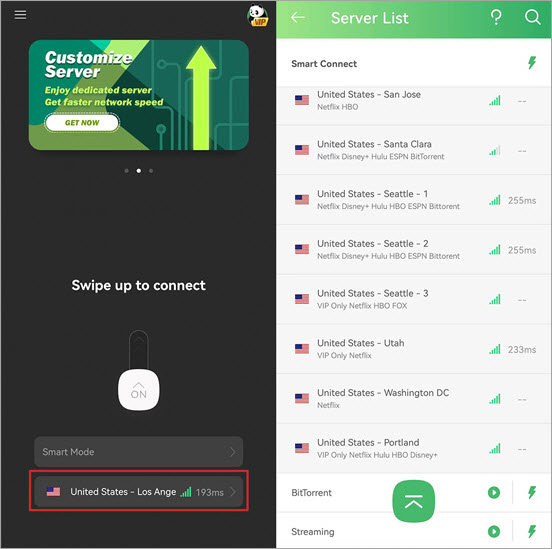
- Step 3: Get Telegram and select your favorite channel, group, or bot. Go to the official website to download Telegram for Mac, Windows, Android, iOS, or Linux, and use Telegram without restrictions.
Best Telegram Channels in 2024
A Telegram channel is a tool for broadcasting public messages to subscribers. There is no upper limit to the number of subscribers, and only administrators have the right to post. Telegram offers both public and private channels. The table below lists popular, safe, and family-friendly public TG channels.
| Telegram Channel List | Description | Subscribers |
| Memes | Funny memes and entertainment | 114,453 |
| Private Art | Stunning artworks from around the globe | 56,745 |
| Science | Science news channel sharing educational videos and articles | 137,035 |
| Engineering | Engineering, technology, and science community | 72,864 |
| Love for Food | Culinary creations for enjoyment or cooking inspiration | 12,490 |
| Global Geography | Sharing the most beautiful places on Earth | 28,297 |
| Wildlife | Exploring nature’s wilderness and beautiful landscapes | 19,650 |
| Wallpaper Central | Best wallpaper resources on web, iOS, and Android | 64,902 |
| Quotes | Famous quotes from authors, movies, and historical figures | 112,857 |
| The New York Times | Latest global news, photos, and videos | 142,805 |
| Ask Me | Get daily general knowledge questions and answers | 92,764 |
| Bitcoin.com News | News regarding the cryptocurrency industry | 29,018 |
| Hindi Shayari | All types of status updates and poetry | 27,306 |
| Daily Channel | Daily introductions to the best Telegram channels | 29,219 |
How to Create a Telegram Channel?
-
On iPhone: 1) Open Telegram, click the message icon in the upper right corner of chats, and select “New Channel”. 2) Click “Create Channel” on the channel introduction page, name your channel, add a description, and tap “Next”. 3) Choose between a public or private channel type. If it is public, add a permanent channel link and tap “Next”.
-
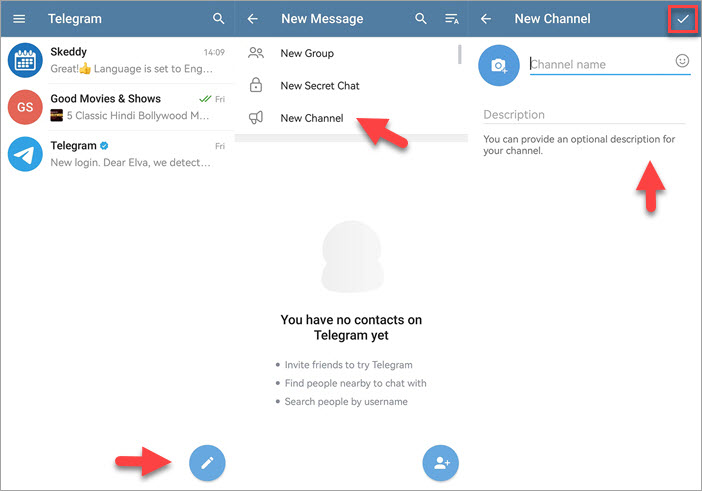
On Android: 1) Open Telegram, click the pencil icon in the bottom right corner, and select “New Channel”. 2) Name your channel, add a description, and tap the checkmark icon in the upper right corner. 3) Choose “Public” or “Private”, set a permanent link, and confirm.
-
On Desktop: 1) Click the menu button in the upper left corner and select “New Channel”. 2) Name your channel, add a description, and click “Next”. 3) Set the channel type to public or private, create a permanent link, and click “Finish”.
How to Join a Telegram Channel?
To join a public Telegram channel, enter the channel name or paste the channel link into the search box, select the correct result, and click “Join”. For private channels, an invitation link from a group administrator is required.
How to Invite Someone to a Private TG Channel?
Open the channel, click the channel name on the chat title to enter the channel info page. Under the “Members” section, click “Subscribers”, select “Add Subscribers”, and tap “Invite via Link”.
Best Telegram Groups in 2026
Telegram groups are powerful tools for building online communities, with each community welcoming up to 200,000 members. Members can chat, share photos and files, and discuss projects. Below are verified, safe, and professional public Telegram groups.
| Telegram Group List | Description | Members |
| No Big Deals | Online deals, coupons, cash back, and shopping savings | 41,102 |
| Book Mania | Community discussions for literature and book enthusiasts | 89,248 |
| English Chat | English chat room focused on clean content and zero spam | 10,394 |
| International Friends | Global cultural exchange and friendly group chat | 33,741 |
| Entrepreneurship | Startup ideas, tech projects, and AMA sessions | 14,559 |
| Customs & MY Road | Road conditions, traffic checks, and travel updates | 78,194 |
| SG Road Chat | Community commuter reporting chat room | 13,647 |
| Movie Thoughts | Discussions on popular films and cinematic dialogue | 12,471 |
| Open Source University | Promoting free and open-source software to the public | 983 |
| Entertainment | Good movie taste and official trailer discussions | 15,630 |
| Fortnite | Fortnite gaming community chat on Telegram | 9,304 |
| Online Gaming | Android, PC, Xbox, and PlayStation gaming discussions | 29,769 |
How to Create a Telegram Group?
On iOS: Tap the icon in the upper right corner of chats, then click “New Group”. On Android: Tap the pencil icon in the chat list, then click “New Group”. On Telegram Desktop: Click the menu button in the upper left corner, then click “New Group”.
How to Join a Telegram Group?
To join a public group, input the group name or paste the group link into the search box, select the correct result, and click “Join”. To join a private group, an invitation link from a group administrator is required.
How to Invite Friends to a Private TG Group?
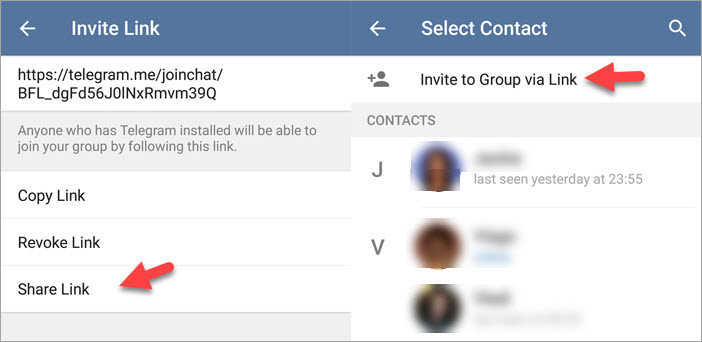
To invite friends to a private Telegram group, generate an invitation link by navigating to Group Info > Add Members > Invite to Group via Link.
Best Telegram Bots in 2024
Telegram bots operate as mini-programs running inside the application, developed using the Telegram Bot API. You can add these utility bots to your channels and groups.
| Telegram Bot List | Description |
| @SkeddyBot | Reminder bot to help you create and manage tasks |
| @IFTTT | Connect your Telegram group or channel to automated web services |
| @SaveMediaBot | Download music, public social media videos, and media assets safely |
| @DrWebBot | Check the security of files and links transmitted through Telegram |
| @NewFileConverterBot | Convert image, audio, or video files from one format to another |
| @QRcodegen_bot | QR code generator and decoder tool |
| @IMDb | Type @imdb in any chat to query movie cast, plot details, and reviews |
| @UrlShortnerBot | Generate short tracking links using trusted services |
Where Can You Find Telegram Channels, Groups, or Bots?
If you want to discover more directories, check out these established platform directories for safe channel, group, and bot discovery:
-
Telegram Channel Search: https://tlgrm.eu/channels | url?id=92 | https://telegramchannels.me/
-
Telegram Group Search: https://telegramguide.com/telegram-group-link/ | https://www.telegram-group.com/en/ | https://pandavpnpro.com/blog/wp-admin/edit.php?post_type=page6
-
Telegram Bot Search: https://botostore.com/c/searcheebot/ | https://bestoftelegram.com/bots/
Content Disclaimer
Disclaimer: This blog post is for informational and educational purposes only. PandaVPN does not endorse, host, or take responsibility for the content, practices, or legality of third-party Telegram channels, groups, or bots. Users are advised to exercise their own discretion and comply with local laws and platform guidelines when accessing third-party communities.
Frequently Asked Questions About TG Channels, Groups, and Bots
-
Q: What is a Telegram Secret Chat?
Telegram secret chats utilize end-to-end encryption for maximum security. Only you and the intended recipient can read messages, meaning even Telegram staff cannot access them. Secret chats are available on mobile devices for one-on-one conversations, block message forwarding, and support self-destruct timers. For enhanced overall privacy and to hide your IP address online, consider using a trustworthy tool like PandaVPN.
Get PandaVPN for Extra Privacy
-
Q: Is Telegram Really Private?
Telegram offers server-client encryption for standard cloud chats and client-client encryption for secret chats. While secret chats provide robust end-to-end encryption, standard cloud chats are stored on Telegram’s cloud servers.
-
Q: How to Permanently Delete Your Telegram Account?
Deleting your account removes all messages, contacts, groups, and channels permanently. 1) Open your browser and go to the Telegram Deactivation Page. 2) Enter your registered phone number in international format and click “Next”. 3) Enter the confirmation code sent inside the Telegram app and sign in. 4) Complete the deactivation process.
-
Q: Can People on Telegram See Your Phone Number?
By default, if you sync your device contacts, people who have your number saved can see your Telegram account. You can change this visibility under Settings > Privacy and Security > Phone Number.
-
Q: Can Law Enforcement Track Telegram?
Telegram cooperates with legal authorities under strict lawful requests for verified terrorism or illegal investigations, while maintaining strong encryption standards for routine user communications.

A tech enthusiast who currently works for PandaVPN enjoys sharing VPN and tech industry information and is passionate about helping others solve their problems.
Related Posts


Featured Posts





